sqz: context compression for AI coding agents
sqz compresses tool output before it enters the model’s context window. It runs as a shell hook on Claude Code, Gemini CLI, Copilot CLI and OpenCode, as agent guidance on Kiro, Codex, Zed, Cursor, Windsurf and Cline, as an MCP server, and as a proxy in front of any other MCP server. Deterministic Rust, no LLM calls, offline, and every compressed result can be recovered byte-exact unless it mentions credentials, a stack trace or a migration, which sqz never caches.
cargo install sqz-cli sqz-mcp     # or: brew install ojuschugh1/sqz/sqz · npm i -g sqz-cli · pipx install sqz
sqz init                          # installs a hook or agent guidance, and the MCP server where it can, for each client it finds
Then work as usual. sqz stats --breakdown shows what it saved, per command, from your own sessions. sqz doctor verifies the whole chain: binary, database, shell hook, which clients are actually routed through sqz, and whether anything was compressed recently.
Not installed yet? If you already use Claude Code or Kiro, sqz discover --replay replays your existing transcripts through the engine and reports, per client, what sqz could have saved: what a hook saves with no help from the agent, and what needs the agent to route output through sqz. It’s a counterfactual estimate on your own sessions, computed locally.
Where the tokens actually go
Across 3,003 real compressions sqz saved 178,442 tokens, a 24.7% average reduction. That number is deliberately not the headline, because most of the tools in this space are graded on ratio alone, and a compressor that hits 90% by dropping the line the agent needed has made the session more expensive.
What the data shows instead:
- Command output dominates. Build logs, test runs,
git status, package installs. A 366-tokencargo testwith one failure becomes the failure, the assertion and thefile:line, 185 tokens including sqz’s own stderr line (cl100k). Commands such asgit,cargo,npm,pytest,go,docker psandterraformhave purpose-built formatters; other output goes through a generic pipeline that folds repeated lines, leaves source code alone, and passes stack traces, migrations and credential lines through unchanged. - Identical file re-reads are rare. Measured on 92 Claude Code sessions by a user who counted: 1 in 542 reads. What repeats is unchanged command output (a 13-token
§ref§), line ranges of a file already read in full (a§ref:HASH:L40-80§), and files re-read after a small edit (a line-level delta through the sqz MCP tools). - Over-compression is tracked, not hidden.
sqz statsreports how often the agent re-ran a command whose output had not changed, or asked for an original back. Those regret signals sit next to the savings so you can discount the number yourself.
Guides
- Stop AI coding agents from re-reading the same files: what repeats, the three kinds of reference, and the one path sqz cannot see.
- MCP context compression: the
sqz-mcptools, the proxy for any MCP server, per-client configuration. - Context rot vs context compression: why compaction arrives late and what proactive context management looks like.
- Choosing a context compression approach: shell wrappers, session dedup, MCP proxies, retrieval and LLM summarisation compared by approach, plus how to compare tools yourself.
Measurements
- Quality benchmark: compression ratio against information preservation, run as a regression test on every change. Includes the zeros and the bugs it found.
- Token savings benchmark: session-level dedup numbers, measured through the shell hook path.
- White paper: pre-injection context compression for agentic code generation.
- Per-formatter reductions, backed by fixtures.
Integrations
- Overview: three integration levels and a config snippet for every client.
- Claude Code, Cursor, Codex CLI, all platforms.
- VS Code, JetBrains, Firefox, Chrome, API proxy.
Reference
- Source and issues on GitHub. If sqz mangles a command you use daily, the best report is the command and its output; it becomes a fixture in the quality benchmark.
- API docs: sqz-engine, sqz-mcp on docs.rs, or this site’s copy.
- Changelog. Machine-readable index for AI tools: llms.txt.
How to Stop AI Coding Agents From Re-reading the Same Files
Watch a coding agent work on a real task and count the file reads. It reads auth.py to understand it, edits three lines, reads it again to check the edit, runs the tests, reads it a third time when a test fails. Every one of those reads costs the full file in input tokens, and then costs it again on every following turn, because the whole transcript is re-sent to the model each time.
Every one of those reads adds to the transcript that is re-sent on every following turn. Multiply by the twenty files an agent touches in an afternoon and file reads are one of the largest line items on the bill. The question is what, exactly, repeats, because that decides what a tool can do about it.
What actually repeats
The intuitive picture is “the same file read five times”. Measured, that is not what happens.
A user counted 92 Claude Code sessions from their own logs (14 days, 11,149 tool results over 200 characters, counters reset at each compaction boundary, edit and write confirmations excluded; the measurement script is published). Byte-identical repeats were 81 of 11,149 results, about 0.3% of result characters. Among file reads specifically, 1 in 542 was an identical repeat. What did show up: 8.4% of file reads were a line range contained in a range already read in full earlier in the same session.
sqz’s own database agrees. In the stats behind the numbers on the README, dedup hits were short repeated shell output (git status with nothing changed, a build re-run, a listing) averaging 57 to 180 tokens each. Across 29 MCP file reads there were zero exact-repeat hits.
So identical re-reads of whole files are rare, and a tool that only catches those is solving a small problem. Three things do repeat:
- Unchanged command output. The agent re-runs
git status,ls, a test suite, and gets byte-identical output. Common, small per hit, adds up. - Line ranges of a file it already has. It read the file in full, then reads lines 40-80 to look at one function. 8.4% of reads in the measurement above. Exact-match dedup misses this, and so does similarity matching: a 40-line slice of a 500-line file has a Jaccard similarity around 0.1 against the whole file, so it never even becomes a candidate.
- The file after a small edit. Most of the bytes are the same, a few lines differ.
Why agents re-read
Not because they are badly written. An agent has no memory outside its context window, so after an edit it cannot know the file looks the way it intended without reading it back. It reads a range because it wants to look at one function without paying for the whole file again, which is the right instinct; it just cannot know the range is already in its context. Re-reading is the correct behaviour given what the agent can see. The waste is in how the read is served, not in the decision to read.
So the fix has to happen below the agent: in the layer that serves tool output.
What sqz does about it
sqz keeps a SHA-256 index of every piece of tool output it has served, with the original bytes stored locally. Each of the three repeat patterns gets its own answer:
Identical output: a reference. When the same bytes come through again, the agent gets a 13-token §ref:e03d5588…§ instead of the content. This is where the repeated git status and the re-run test suite go.
A line range of something the model has: a ranged reference. When the new output is, byte for byte and on line boundaries, a slice of a recent full read, the agent gets §ref:e03d5588…:L40-80§: lines 40-80 of content it already has. This works for sed -n '40,80p' auth.py and head -50 auth.py through the shell hook, and for sqz_read_file with offset and limit through MCP. Two guards: the slice has to be at least 160 bytes and two lines (below that the token costs about as much as the text), and the same bytes must appear in what was actually served for the full read, so a ranged reference never points at lines a lossy stage dropped.
$ sed -n '41,80p' auth.py            # after `cat auth.py` earlier in the session
[sqz] slice ref: lines 41-80 of 200 already in context
§ref:e03d55889cad8a3a:L41-80§
The file after a small edit: a delta. Through sqz_read_file, sqz detects the near-duplicate (SimHash, then a line-level diff) and returns what changed, with one unchanged line on each side of each change as an anchor. Measured on a 7,140-byte Python file with two lines appended: the re-read came back as 181 characters.
[sqz_read_file path=src/auth.py size=7182]
§delta:e03d55889cad8a3a§
 @@ skip 239 unchanged lines @@
     return respond(user, status=200)
+def handler_new(request):
+    return None
Line numbers in a delta count from 1, and the skipped and shown lines add up to the whole file. When the delta would not be shorter than the file, for example after edits spread all through it, the file is sent in full. A ranged read (offset and limit) never comes back as a delta: it is either the ranged reference above or the lines themselves. Content of 13 tokens or fewer, such as an empty file, is always sent in full, since a reference would cost as much; it is still stored, so expand and sqz_recall find it.
None of these is a summary. Each points at bytes the model already has in its context, and the guidance sqz init writes for the agent (CLAUDE.md, AGENTS.md, Kiro steering) tells it exactly what the tokens mean and how to expand them if it needs the bytes again.
Two more details make this safe rather than clever:
Freshness. A reference is only served if the content was last seen within the last 30 minutes and after the most recent context compaction. Claude Code’s PreCompact hook calls sqz hook precompact, which marks every cached reference stale; the next read sends the full file again because the model’s context no longer has it. If sqz cannot tell, it sends the file. On clients without a compaction hook you can shorten the window with SQZ_REF_TTL_SECS (seconds; 0 disables refs entirely).
Recovery. sqz expand e03d5588 on the CLI, or the expand MCP tool, returns the original byte-exact. sqz expand 'e03d5588:L41-80' returns just those lines. Nothing is ever unrecoverable.
The catch: which reads sqz can see
This matters and most write-ups skip it.
sqz intercepts file reads in two places:
- Shell commands. The hook that
sqz initinstalls for Claude Code, Gemini CLI and Copilot CLI (and the OpenCode plugin) rewrites shell commands to pipe throughsqz compress. Socat src/auth.py,head -50 config.yaml,sed -n '10,40p' main.rsare all deduplicated. On Kiro, Codex, Zed, Cursor, Windsurf and Cline there is no such hook, and the agent has to pipe the command itself. - The
sqz_read_fileMCP tool. Registered bysqz initfor Claude Code, Kiro, Codex, Zed and OpenCode; other clients add it by hand.
What sqz does not intercept is the client’s built-in Read tool. Claude Code’s Read, Cursor’s file viewer and the equivalents in other clients do not go through Bash, and sqz does not rewrite their results. On Claude Code, sqz’s PostToolUse hook covers Bash only: it replaces the output of commands the PreToolUse hook left alone.
This is why sqz init also writes guidance into the agent’s instructions (CLAUDE.md, AGENTS.md, Kiro steering) telling it to prefer sqz_read_file for anything over about 2 KB or anything it may read twice, and to keep using the built-in Read for tiny config files and byte-exact needs like lockfiles. The agent’s file reads move to the tool that can dedupe them. In practice agents follow this well; when they do not, sqz stats shows it as a smaller-than-expected dedup share and you can strengthen the instruction.
Checking it works
sqz stats --breakdown
The dedup row is identical repeats and the slice row is ranged re-reads, so you can see for yourself which kind of repetition your sessions actually contain. Underneath, sqz stats prints two regret signals: quick re-runs of byte-identical output (the agent asked again within two minutes, which usually means the first serving was missing something) and ref expands (a recovery round trip). Both should be small. If one command dominates the re-run list, its formatter is dropping something an agent needs; open an issue with the command and sqz will get a fixture for it in the quality benchmark.
sqz gain
shows the saved tokens per day as a bar chart, so you can see the effect the day you install it.
What this does not fix
- Reads through a client’s built-in Read tool, for the reason above. The instruction file steers the agent to
sqz_read_file, including for ranged reads; it cannot force it. The 8.4% figure above was measured on built-in Read calls, which is exactly the path sqz never sees unless the agent is redirected. - The first read. sqz compresses command output where it safely can (see how compression works), but a source file read is served in full by design, because an agent that reads a file is usually about to edit it. The saving on files is the repeat, not the first read.
- The transcript re-send. Every provider re-sends the full conversation each turn; sqz makes what enters the transcript smaller, it cannot change how the provider bills it. Prompt caching helps with the re-send and stacks with sqz:
sqz stats --costmodels the saving under a cached billing model, which is the conservative case.
Setup
cargo install sqz-cli sqz-mcp     # or brew / npm / pipx, see the README
sqz init
sqz init installs the hook, registers the MCP server and writes the agent guidance for every client it finds. Everything is local: the dedup index lives in ~/.sqz/sessions.db (or wherever SQZ_DB_PATH points), no telemetry, no network.
MCP Context Compression for AI Coding Agents
Every MCP tool result an agent receives is billed as input tokens, on every turn, for the rest of the session. A verbose tools/list alone can cost 10-40k tokens before the agent has done anything. sqz-mcp is a compression layer for that traffic: an MCP server with compressed file, grep and directory tools, and a proxy that wraps any other MCP server and compresses what comes back. No LLM calls, deterministic, offline, and every compressed result is recoverable byte-exact unless it mentions credentials, a stack trace or a migration, which sqz never caches.
Install (sqz init registers it with Claude Code, Kiro, Codex, Zed and OpenCode; other clients take the config below by hand):
cargo install sqz-cli sqz-mcp      # or: brew install ojuschugh1/sqz/sqz, npm i -g sqz-cli, pipx install sqz
sqz init
Registry name: io.github.ojuschugh1/sqz on the official MCP Registry. API docs: docs.rs/sqz-mcp.
Two ways to use it
1. As an MCP server: compressed replacements for the expensive tools
Agents burn most of their context on three operations: reading files, grepping, and listing directories. sqz-mcp exposes drop-in versions of each, plus tools for compressing, recovering and searching content:
| Tool | What it does | Why it saves tokens |
|---|---|---|
sqz_read_file | Read a file. Content is returned faithfully (every line, identifier and line number; only ANSI codes stripped). Output stops at 256 KB on a line boundary and the header gives continue_with_offset (max_bytes changes it, 0 lifts it). | A repeat read of unchanged content returns a 13-token §ref:HASH§ reference instead of the file, and a re-read after a small edit returns a delta: the changed lines with one unchanged line on each side. Agents re-read the same file after every edit; this is where the savings are. A ranged re-read is never a delta, and content of 13 tokens or fewer (an empty file, a search with no matches) is always sent in full and still stored. |
sqz_grep | Literal or regex search under a path, path:lineno:text output, capped at max_matches (default 200) and 100 KB (max_bytes). A match line over 400 chars is clipped to a window around the hit (max_line_chars). | The caps stop one popular term or one minified bundle from flooding the context. Repeat searches dedupe. |
sqz_list_dir | Directory listing that skips .git, node_modules, target, dist, build, vendor, __pycache__. max_depth 1 (the default) is the immediate children; stops at 1000 entries (max_entries). | No permission/owner/date columns, no bulk directories, repeat listings dedupe. |
compress | Run arbitrary text through the generic pipeline (log folding, JSON compaction, dedup). Per-command formatters run only on the shell path. When it drops low-information segments of text it stores, the output ends with [full output: call expand with prefix "<16 hex>"]. | For output the agent already holds and wants to shrink before re-sending. |
passthrough | Return text unchanged. | Escape hatch for models that cannot parse §ref§ tokens. |
expand | Resolve a §ref:HASH§ token (or bare hex prefix) to the original bytes. | Makes every cached compression reversible. |
sqz_recall | Full-text search (SQLite FTS5) over everything sqz has compressed in past sessions. | Recovers context lost to compaction without re-running commands. |
The read, grep and list tools are lossless by design (issue #32): a file read that silently dropped lines would break edits. Their token savings come from dedup and from not fetching what the agent does not need, not from summarising. When a size cap cuts output, the header says what was cut.
The tool descriptions themselves are kept short and tell the agent when to prefer the built-in tool instead (tiny config files, byte-exact lockfile reads).
2. As a proxy: compress any other MCP server
sqz-mcp proxy sits between the client and any stdio MCP server. Prefix the server’s command in your MCP config and nothing else changes; the client sees a normal MCP server.
{
  "mcpServers": {
    "github": {
      "command": "sqz-mcp",
      "args": ["proxy", "--", "npx", "-y", "@modelcontextprotocol/server-github"]
    }
  }
}
On the way back to the client the proxy:
- compresses
tools/calltext results through the generic sqz pipeline: dedup§refon repeats, stack traces, credential lines and migrations passed through unchanged, a 16-token net-win gate so small results are never made worse. With the cache on (the default), originals are persisted and recoverable, except results that mention credentials, a stack trace or a migration, which are never cached;--no-cacheturns caching off. - compacts
tools/listdescriptions (whitespace collapsed, capped at 400 characters, input schemas untouched). With--lazy-toolsthe cap drops to one sentence (160 characters) and an injectedsqz_tool_helptool serves the full original documentation for any tool on demand. - appends an
sqz_expandtool to the upstream tool list and answers calls to it locally, so the agent can recover any cached or referenced result byte-exact. With--no-cachenothing is stored, so the tool is left out. - adds a short note to the
initializeinstructions explaining what§ref:HASH§means. With--no-cachethe note says only that results pass through the proxy.
Error results, non-text content, notifications, and every client-to-server message pass through verbatim.
Flags: --lazy-tools (one-sentence descriptions plus sqz_tool_help), --no-desc (keep descriptions verbatim), --no-cache (store nothing: no dedup refs and no sqz_expand). Run sqz-mcp proxy --help.
When the client closes stdin, the proxy closes the upstream’s stdin and gives it 2.5 seconds to exit, then stops it and waits up to another 2.5 seconds while it passes on a result it had already read. A response the upstream had not sent by then is lost; MCP clients keep stdin open while they wait, so this mostly affects scripted one-shot use.
Per-client configuration
sqz init writes these for Claude Code, Kiro, Codex, Zed and OpenCode. Shown here for manual setups and for checking what it did.
Claude Code (~/.claude.json), Kiro (.kiro/settings/mcp.json, or ~/.kiro/settings/mcp.json for every workspace), Cursor, Windsurf, Cline, Gemini CLI and Copilot CLI take the same JSON shape:
{
  "mcpServers": {
    "sqz": {
      "command": "sqz-mcp",
      "args": ["--transport", "stdio"]
    }
  }
}
Codex CLI uses TOML in ~/.codex/config.toml:
[mcp_servers.sqz]
command = "sqz-mcp"
args = ["--transport", "stdio"]
OpenCode uses its own mcp object in opencode.json: "sqz": {"type": "local", "command": ["sqz-mcp", "--transport", "stdio"], "enabled": true}.
Zed uses context_servers in settings.json; Continue uses ~/.continue/config.json. Ready-to-paste snippets for every client are in integrations/.
Server flags: --transport stdio|sse (default stdio), --port PORT (SSE, default 3000), --preset-dir DIR, and --version, which prints the version and exits. Set SQZ_DB_PATH in the server’s env block to keep the dedup cache and stats per project instead of in ~/.sqz/sessions.db.
How it relates to the shell hook
For Claude Code, Gemini CLI and Copilot CLI, sqz init also installs a hook that rewrites shell commands to pipe their output through sqz compress; on OpenCode a plugin does the same. The hook covers shell commands; the MCP server covers file reads, greps and listings, which the hook cannot see because those go through the client’s built-in tools rather than Bash. Use both. Kiro, Codex, Zed, Cursor, Windsurf and Cline can’t let sqz rewrite tool calls, so there sqz init installs steering, AGENTS.md guidance or a rules file that tells the agent to pipe long commands through sqz compress and to prefer the sqz_* MCP tools.
Guarantees
- Zero LLM calls. Every transform is deterministic Rust. Same input, same output, no model in the loop, works offline.
- Recoverable. Every cached or deduplicated result can be expanded back to the original bytes with
expand(server) orsqz_expand(proxy), and lossy output says which prefix to pass. Results that mention credentials, a stack trace or a migration are never cached, so a lossy compression of one cannot be expanded. - Keeps serving. The server answers MCP
ping. A request that panics is still answered (compressreturns its input unchanged, other tools return JSON-RPC error -32603, the proxy passes the upstream result on as it came) and the next one is served as usual. A line that is not valid UTF-8 gets a -32700 parse error from the server and is passed on by the proxy with the bad bytes replaced. - Never worse. A 16-token net-win gate returns the original when compression would not pay for its own header.
- Safe mode. Stack traces, migrations, PEM blocks and credential lines come back unchanged at any size from the proxy and from the
compresstool. No tool caches content that mentions credentials, a stack trace or a migration, so a repeat read of such a file is sent in full. - No telemetry. The dedup cache and stats live in a local SQLite file you own.
Measured quality, including what compression drops and what it never touches, is in the quality benchmark.
Context Rot vs Context Compression: Proactive vs Reactive Context Management for AI Coding Agents
“Context rot” is the name that has stuck for a pattern anyone running long agent sessions has seen: the model gets worse before it gets full. Answers reference stale state, edits go to the wrong file, the agent repeats a command it ran ten minutes ago. Nothing has overflowed yet. The context is simply carrying too much that no longer matters, and the useful parts are getting harder to find.
This page is about where that degradation comes from, why the usual remedy (compaction) arrives late, and what it means to manage context before it enters the window rather than after.
Where the rot comes from
Almost none of it is the conversation. In a coding session the transcript is dominated by tool output: build logs, test runs, git status, directory listings, file contents. Three properties of that output cause the damage.
Volume. A single npm install can be 1,000 tokens of deprecation notices around one line the agent needs. A 2,000-line build log usually matters for six lines. Everything else is dead weight the model has to attend across on every turn.
Repetition. The same file read after every edit. git status twenty times. The same test suite run until it passes, with the same 40 passing tests listed each time. Repeated content is worse than merely wasteful: near-identical blocks compete for the model’s attention and make it easier to pick up the stale copy.
Persistence. Once tool output is in the transcript it stays there and is re-sent on every following turn. A verbose result from turn 3 is still being paid for, and still diluting attention, on turn 60.
Why compaction is late
Every major agent harness has a compaction step: when the context approaches its limit, an LLM summarises the transcript and the session continues from the summary. It is necessary. It is also reactive by construction.
- It triggers on size, not on quality. Rot accumulates from the first verbose tool result; compaction does nothing until the window is nearly full. In between, every turn is paying for and attending across the accumulated waste.
- It costs a model call. Summarising a 150k-token transcript is itself expensive, and it happens at the moment the session is most expensive.
- It is lossy in ways you cannot audit. The summary keeps what the summarising model judged important. The exact error message from an hour ago, the precise line number, the branch name: whether those survive is up to another LLM, and there is no way to get them back if they do not.
- It resets the agent’s memory of what it has seen, so the re-reads start again.
Compaction treats the symptom at the last possible moment. The cause is upstream: what was allowed into the context in the first place.
Pre-injection context compression
The alternative is to intervene at the point where tool output is about to enter the context, and make three decisions there, deterministically, before the model sees anything:
- Is this a repeat? If the same bytes were served earlier in the session and are still in the model’s context, send a 13-token reference instead. This removes repetition at the source and does not depend on a model noticing the duplicate.
- What in this output carries information? For a known command, a purpose-built formatter keeps what an agent acts on (the failing test, the assertion, the
file:line, the changed lines of a diff, the pod that is crashing) and drops what it does not (progress dots, passing tests, deprecation prose, alignment padding). For unknown output, generic stages fold repeated log lines and collapse table padding, and stop there. - Is this something that must not be touched? Source code an agent is about to edit passes through unchanged, and so do stack traces, migrations and credential lines, at any size. The rule is that a wrong drop costs more than any saving.
This is what sqz does. It runs as a shell hook on Claude Code, Gemini CLI, Copilot CLI and OpenCode, as agent guidance on clients that can’t let sqz rewrite tool calls (Kiro, Codex, Zed, Cursor, Windsurf, Cline), and as an MCP server for file reads, greps and directory listings, so the compression happens inside the tool call, before the result is appended to the transcript. There is no model in the loop: the transforms are deterministic Rust, so the same output compresses the same way every time, and everything that was compressed can be recovered byte-exact with sqz expand, except output that mentions credentials, a stack trace or a migration, which sqz never caches.
Because it acts before injection, the effect is cumulative in the right direction. Each turn’s transcript is smaller than it would have been, so every following turn is cheaper and less diluted, and compaction is reached later or not at all.
Proactive and reactive are not exclusive
Pre-injection compression does not replace compaction; it changes what compaction has to work with. A transcript that never took in the 1,000 tokens of npm warn deprecated does not need a model to summarise them away. The two also interact: when compaction does happen, sqz’s PreCompact hook marks its cached references stale, so the next file read sends the full file rather than pointing at content the summary may have dropped.
And when compaction has already lost something, sqz recall searches everything sqz served during the session (a local full-text index, nothing leaves the machine) so the agent can recover the exact error output from an hour ago instead of re-running the command that produced it.
What to be sceptical of
Any tool in this space, sqz included, should be judged on what it drops, not on its reduction percentage. A compressor that hits 90% by removing the line the agent needed has made the session more expensive, because the agent re-runs the command, retries in circles, or produces a worse answer. sqz publishes a quality benchmark that measures fact retention alongside reduction, fails its own build when a fact goes missing, and tracks regret signals (quick re-runs and reference expands) in normal use so over-compression is visible in sqz stats rather than hidden in a headline number.
The honest summary of the measured effect: about 25% average token reduction across real sessions, rising to 90%+ on the repeat reads that dedup catches, with no change to source files or to stack traces, migrations and credential lines. Compaction still happens. It happens later, on a transcript that was never allowed to rot as fast.
See also
- How to stop AI coding agents from re-reading the same files
- MCP context compression
- Quality benchmark: compression ratio vs information preservation
Choosing a Context Compression Approach for AI Coding Agents
There are now several tools that promise to cut what coding agents spend on tokens, and they are not interchangeable. They intercept at different points, make different bets on what is safe to drop, and fail in different ways. This page compares the approaches rather than the products, because the products change monthly and a name-based table would be stale and self-serving within a quarter. Where sqz sits in each category is stated plainly, along with what it does not do.
If you want numbers, the last section describes how to run any tool through the same fixtures sqz uses to grade itself.
The five approaches
1. Shell-command wrappers and hook rewriters
How it works. The tool rewrites the agent’s shell commands (through a PreToolUse hook, a shell function, or a wrapper binary) so output is piped through a compressor before the agent’s harness captures it. Per-command formatters know what cargo test, git status or kubectl get pods look like and keep the parts that matter.
Strengths. Transparent: the agent does not know it is there. Deterministic and cheap: no model call; for sqz a call takes about 39-43 ms on outputs up to 10 KB, mostly process start and tokenizer setup. Highest reduction on verbose, repetitive output (build logs, passing tests, package installs). Precise about what it keeps because each formatter is written for one command’s structure.
Limits. Only sees shell output. File reads that go through a client’s built-in Read tool never pass through Bash and are invisible to it (anthropics/claude-code#4544). Coverage is per command: unknown commands fall back to generic heuristics, which is where over-compression risk lives. Quality depends entirely on how strict the formatters are about dropping content.
Where sqz sits. This is sqz’s shell hook on Claude Code, Gemini CLI and Copilot CLI (and OpenCode’s plugin): per-command formatters, a generic pipeline that folds repeated log lines and table padding but leaves source code alone and passes stack traces, migrations and credential lines through unchanged, and a 16-token net-win gate that returns the original when a compression saves less than that. Its exit-status trailer protocol preserves the command’s real exit code through the pipe, which a naive cmd | compress loses.
2. Session-level deduplication
How it works. Content-hash everything served to the agent. When the same bytes come back (a file re-read after an edit, git status for the twentieth time, the same failing test output), serve a short reference to the earlier copy instead of the content. Near-duplicates can be served as a line-level delta.
Strengths. Attacks the single largest waste in real sessions: repetition. Lossless in the strict sense, since the reference points at bytes already in the model’s context. Works on any content, not just known commands. A repeat read costs ~13 tokens regardless of file size, so savings scale with how much the agent re-reads, which is a lot.
Limits. The reference is only valid while the original is still in the model’s context. After a compaction, or after enough time, the tool must know to send the full content again or the model is pointed at something it no longer has. Some models handle reference tokens poorly and need an opt-out. Requires state (a local database) that survives across the short-lived hook processes.
Where sqz sits. Dedup is the core of sqz’s session model: SHA-256 index in a local SQLite database, 30-minute freshness window, invalidation on the harness’s PreCompact hook, line-level deltas for edited files through the MCP read tool, and sqz expand to recover any reference byte-exact. --no-cache and SQZ_NO_DEDUP=1 exist for models that cannot parse the tokens.
3. MCP-layer compressors and proxies
How it works. Sit between the client and MCP servers as an MCP server yourself: either offer compressed replacements for expensive tools (file read, grep, list) or wrap an upstream server and compress its tools/call results and tools/list descriptions in transit.
Strengths. Reaches traffic the shell hook cannot: file reads through MCP tools, third-party server results, and the tool-description bloat that can cost 10-40k tokens per session before any work starts. Client-agnostic, because every MCP client just sees a normal server.
Limits. The agent has to choose the compressed tool over the built-in one; that is done with instructions (CLAUDE.md, AGENTS.md, steering), which the agent follows but cannot be forced to. Proxying adds a process hop. Compressing another server’s results generically is riskier than compressing a known command, so the safe-content rules matter more here.
Where sqz sits. sqz-mcp provides sqz_read_file, sqz_grep and sqz_list_dir (lossless, dedup-backed) plus sqz-mcp proxy for wrapping any stdio server, with description compaction, --lazy-tools one-sentence descriptions backed by an on-demand help tool, and an injected sqz_expand for recovery. Details in MCP context compression.
4. Retrieval and indexing layers
How it works. Index the repository (symbols, embeddings, file summaries) and serve the agent snippets or a repo map in place of full files, so it reads less in the first place.
Strengths. Reduces the first read, which the approaches above cannot. Good for orientation in large unfamiliar codebases. Complementary to compression: less enters the context, and what enters can still be compressed.
Limits. Returning a summary or snippet in place of a file is a judgement call, and a wrong one means the agent edits without seeing the code it is changing. Requires an index that stays in sync with the working tree. Often runs as a separate daemon with its own cost and failure modes. On code the model has effectively memorised (popular libraries), an index adds tokens without adding information.
Where sqz sits. sqz does not do repository indexing. Its structural-summary API (imports plus signatures plus call graph) exists in the engine crate for consumers that want it, but the hook and MCP paths deliberately serve full source on first read. sqz recall indexes what sqz has already served, not the repo, so an agent can find an old error message after compaction without re-running the command. A retrieval layer and sqz stack cleanly.
5. LLM-based summarisation and task-aware pruning
How it works. Send tool output (or the whole transcript) to a model and ask it to keep what is relevant to the current task. This is also what built-in compaction does when the context fills up.
Strengths. Can reason about relevance in a way rules cannot. Handles novel output formats. Can achieve the highest reduction percentages on prose-heavy content.
Limits. Costs a model call per compression, which can exceed the tokens saved on small outputs. Non-deterministic: the same output compresses differently each run, so behaviour is hard to test and regressions are hard to catch. Lossy in ways that cannot be audited or reversed; the exact line number, the branch name, the precise error string survive only if the summarising model decided they mattered. Adds latency to every tool call. Requires network access and a provider.
Where sqz sits. sqz makes zero LLM calls, by design. Every transform is deterministic Rust, runs offline, and is reversible. That rules out the highest headline reductions on prose, and sqz accepts that trade: its measured average across real sessions is about 25%, with 90%+ on the repeats dedup catches, and 0% on source files and on stack traces and credential lines. The quality benchmark exists because a compressor should be graded on what it drops, not on its percentage.
Summary
| Approach | Reaches | Deterministic | Reversible | Main risk |
|---|---|---|---|---|
| Shell wrapper / hook | Bash output | yes | with a cache | formatter drops something needed |
| Session dedup | anything repeated | yes | yes | stale reference after compaction |
| MCP compressor / proxy | file reads, third-party tools, tool descriptions | yes | with a cache | agent ignores the compressed tool |
| Retrieval / indexing | the first read | usually | n/a | snippet served where full file was needed |
| LLM summarisation | anything | no | no | silent loss of exact details, per-call cost |
sqz combines the first three. It does not do the fourth (a retrieval layer stacks with it) and deliberately not the fifth.
How to compare tools yourself
Compression ratio alone rewards the tool that drops the most. Measure these instead, on the same inputs, for every tool:
- Critical-fact recall. For each realistic output, list the facts an agent needs (failing test name, assertion text,
file:line, changed diff lines, the crashing pod, the vulnerability count). Check each survives verbatim. One missing fact is a failure, whatever the ratio. - Agent-visible tokens. Count everything the agent sees, including the tool’s own status lines. A header that costs 12 tokens on a 20-token saving is a loss.
- Untouchable content. Stack traces, secrets, source code, diffs. These should come out byte-identical.
- Recovery. Can the original be recovered exactly after compression? With what command?
- Regret in real use. Does the tool track how often the agent re-runs a command whose output had not changed, or asks for the original back? That rate is the field measurement of over-compression.
- The built-in Read tool. Test a session where the agent reads files through the client’s native tool, not Bash. Most shell-level tools report a number that excludes this path entirely.
sqz’s fixtures for points 1-4 are plain text in sqz/tests/quality_bench.rs; pipe them through any other tool and compare. Results for sqz, including the zeros, are in the quality benchmark. Session-level dedup numbers are in benchmark.md.
Context Compression Quality Benchmark: Compression Ratio vs Information Preservation
Token reduction is easy to inflate. Drop the one line the agent needed and the headline number goes up while the agent re-runs the command, retries in circles, or ships a worse answer. This benchmark measures both sides of that trade for sqz, on the exact code path the shell hook uses, and it runs as a regression test on every change.
Reproduce it:
cargo test -p sqz-cli --test quality_bench -- --nocapture
Source: sqz/tests/quality_bench.rs. The fixtures, facts and gates are all in that one file.
What is measured
Each fixture is realistic command output paired with a list of facts an agent would need from it: the failing test name, the assertion, the file:line, the changed lines of a diff, the pod in CrashLoopBackOff, the vulnerability count. The fixture is pushed through the real sqz binary exactly as the hook does (sqz compress --cmd <cmd> on stdin, isolated database via SQZ_DB_PATH), and five things are recorded:
| Metric | How |
|---|---|
| Token reduction | ceil(bytes / 4) on input vs everything the agent sees: compressed stdout plus sqz’s own stderr lines. The [sqz] N/M tokens header is counted against sqz. |
| Critical-fact recall | Every fact must appear verbatim in the compressed stdout. One missed fact fails the test. |
| Noise dropped | Lines the fixture expects compression to remove (progress dots, deprecation chatter, passing tests). Reported, not gated. |
| Verbatim preservation | The git show rev:path, traceback and secrets fixtures must come out identical to the input, up to trailing whitespace. |
| Byte-exact recovery | A second run of the same output must return a §ref:HASH§ dedup token, and sqz expand HASH must return the original bytes. Sensitive content must instead never be persisted. |
Facts are chosen for what an agent needs to act, not for what sqz happens to keep. When the two disagreed during development, the formatter was fixed, not the fixture (see the bug list below).
Results
sqz main after 1.9.0, October 2026, default settings (dedup on, abbreviation on).
| Fixture | Command | Tokens in | Tokens out | Reduction | Facts kept | Noise dropped | Recovery |
|---|---|---|---|---|---|---|---|
| grep, 45 matches in 3 files | grep -rn compute_fee src tests | 667 | 479 | 28.2% | 48/48 | n/a | byte-exact |
| find, 80 files | find . -name '*.py' | 515 | 515 | 0.0% | 80/80 | n/a | byte-exact |
| ls -la, 40 entries | ls -la reports | 592 | 592 | 0.0% | 40/40 | n/a | byte-exact |
| kubectl get pods -o json | kubectl get pods -o json | 1671 | 627 | 62.5% | 13/13 | n/a | byte-exact |
| kubectl apply with an error | kubectl apply -f k8s/ | 89 | 89 | 0.0% | 3/3 | 0/1 | byte-exact |
| aws ec2 describe-instances, 40 | aws ec2 describe-instances | 4693 | 1412 | 69.9% | 80/80 | n/a | byte-exact |
| gh pr view –json | gh pr view 214 --json title,body,comments,files | 109 | 109 | 0.0% | 4/4 | n/a | byte-exact |
| gh pr diff | gh pr diff 214 | 294 | 205 | 30.3% | 4/4 | n/a | byte-exact |
| terraform plan | terraform plan | 159 | 103 | 35.2% | 3/3 | 1/1 | byte-exact |
| npm install failure | npm install | 153 | 153 | 0.0% | 3/3 | n/a | byte-exact |
| git push rejected | git push | 145 | 92 | 36.6% | 3/3 | 1/1 | byte-exact |
| git show rev:path | git show HEAD~3:src/billing/refund.py | 62 | 62 | 0.0% | 2/2 | n/a | byte-exact |
| cargo test failure | cargo test | 303 | 154 | 49.2% | 5/5 | 2/3 | byte-exact |
| pytest failure | pytest | 311 | 71 | 77.2% | 5/5 | 3/3 | byte-exact |
| tsc errors | tsc --noEmit | 126 | 92 | 27.0% | 6/6 | 2/2 | byte-exact |
| git diff | git diff | 148 | 148 | 0.0% | 7/7 | 0/1 | byte-exact |
| git status | git status | 155 | 82 | 47.1% | 6/6 | 3/3 | byte-exact |
| npm install | npm install | 161 | 39 | 75.8% | 4/4 | 2/2 | byte-exact |
| kubectl get pods | kubectl get pods | 183 | 183 | 0.0% | 10/10 | n/a | byte-exact |
| docker ps | docker ps | 193 | 79 | 59.1% | 6/6 | 1/1 | byte-exact |
| JSON API response | curl https://api.example.com/v1/orders/ord_8812 | 129 | 130 | -0.8% | 11/11 | 1/1 | byte-exact |
| app log with repeats | tail -n 200 app.log | 1025 | 135 | 86.8% | 3/3 | 2/2 | byte-exact |
| source file read | cat src/billing/refund.py | 221 | 221 | 0.0% | 5/5 | n/a | byte-exact |
| python traceback | python app.py | 82 | 82 | 0.0% | 4/4 | n/a | passthrough, never cached |
| dotenv with secrets | cat .env | 78 | 78 | 0.0% | 4/4 | n/a | passthrough, never cached |
| Aggregate | 12,264 | 5,932 | 51.6% | 359/359 |
Regression gates enforced by the test: 100% fact recall on every fixture, output identical to the input (up to trailing whitespace) for the git show rev:path, traceback and secrets fixtures, byte-exact recovery for everything else, no persistence of the traceback and secrets fixtures, and at least 40% aggregate reduction across the other fixtures.
Reading the zeros
The 0.0% rows are deliberate and are the point of the benchmark. In each of them sqz returned the input unchanged: either nothing was safe to remove, or what could be removed saved fewer than 16 tokens, and the net-win gate passes the original through rather than add a header for that.
- find, ls -la. No per-command formatter; both go through the generic pipeline. Output where most lines are records (bare paths,
ls -lentries) is never entropy-truncated below 16,000 characters, so every line stays, and collapsing thels -lacolumn padding saves almost nothing in real tokens. - kubectl get pods, gh pr view –json. Their formatters were removed because they replaced the data with a summary. The generic pipeline keeps every row and field, and the table padding and the small JSON object leave less than 16 tokens to save.
- kubectl apply with an error, npm install failure. A formatter’s result is not used when it would lose a line that reports the failure (
Error from server,npm error). The output then goes through the generic pipeline, which keeps error lines and here found less than 16 tokens to save. - git show rev:path. The
git showformatter passes file contents through, and the pipeline treats them as source code, like the source file read below. - git diff. Every changed line is a fact. sqz’s diff formatter found nothing safe to remove, and the generic pipeline agreed, so the output passed through untouched with no stats header. An earlier build reported this same fixture as a 15% reduction because it compared a BPE token count for the input against a bytes/4 estimate for the output. That mismatch inflated every pipeline-path number in
sqz statsand is fixed. - source file read. An agent that runs
caton a file is usually about to edit it. The pipeline now detects source code and skips every line-dropping stage. Before this, the entropy truncator scored the imports and theclassline as “low information” and removed them. The saving on file reads comes from dedup instead: the second read is 13 tokens. - python traceback. The
Traceback (most recent call last):line followed byFilelines routes it to safe mode, which passes it through unchanged at any size, a long chained traceback included. Like the dotenv fixture it is never written to the cache. - dotenv. The key assignments route it to safe mode, and credential lines pass through unchanged at any size. Safe-mode content is also never written to the cache on this path, which the test proves by checking that a repeat run does not produce a dedup reference.
The JSON API row is the one where the agent sees more than the raw output. Null stripping, flattening and TOON encoding cut the payload from 165 to 138 cl100k tokens, enough to pass the net-win gate, but the [sqz] header line, which repeats the full curl URL, costs more than that saving, so the total in this table comes out one token larger.
Regret: the metric that catches over-compression in the field
A fixture can only test facts someone thought of. For everything else, sqz tracks two signals in normal use and prints them in sqz stats:
- Quick re-runs. The agent produced byte-identical output within 120 seconds of last seeing it (
SQZ_REGRET_WINDOW_SECSto tune,0to disable). The repeat bought no new information, which usually means the compressed first serving was missing something. Grouped by command, so the formatter at fault is visible. - Ref expands. A
§ref:HASH§token was expanded back to its original bytes. A recovery round trip.
These are reported next to the savings total as a rate, not subtracted from it. The token cost of the re-run itself is small and misleading: the second serving is identical, so it hits the dedup cache and goes out as a 13-token reference. The real cost is the wasted agent turn, which sqz cannot see from tool output alone. Any dollar figure for it would be an invented multiplier, so sqz stats --cost models direct token cost only and says so.
What this benchmark does not measure
- Agent task success. Whether a model given the compressed output completes the task as often as with the raw output. This needs a live model, a task set and many runs, and it is the number that matters most. Fact recall is the proxy used here because it is deterministic and cheap enough to run on every commit.
- Real tokenizer counts. The table uses bytes/4; the
[sqz] N/M tokensheader counts cl100k tokens.cargo test -p sqz-engine cmd_formatter_benchre-measures the formatter fixtures with the cl100k BPE tokenizer and fails if chars/4 overstates the cl100k reduction by 10 points or more (latest run: 63.7% by chars/4, 74.0% by cl100k). - Session-level effects. Dedup across a whole session (the 13-token repeat) is where most real savings come from. That is measured separately in benchmark.md and in the
sqz statsfigures on the README, which come from real usage, not fixtures. - Abbreviation losses. N-gram abbreviation replaces repeated phrases with
«A1»symbols plus a legend. A fact inside a repeated phrase still counts as kept if it appears in the legend. Use--no-abbrevorSQZ_NO_ABBREV=1if an agent struggles with the symbols.
Bugs this benchmark found on its first run
Listed because they are the kind of loss that a ratio-only benchmark hides, and because they are now regression-tested.
| Command | What was lost | Fix |
|---|---|---|
npm install | The 3 vulnerabilities (1 moderate, 2 high) line and the npm audit fix hint. An early return on the “added N packages” line skipped everything after it. | Collect all summary lines. |
docker ps | Columns mis-parsed whenever COMMAND or CREATED contained spaces ("uvicorn app:app", 2 hours ago), so status and ports landed in the wrong cells. | Slice rows at the header’s column offsets instead of splitting on whitespace. |
git status | The branch name and ahead/behind line. | Keep the leading branch and tracking lines; drop only “up to date”. |
pytest | The file:line of the failure, the failing source line and the 1 failed, 41 passed totals. Only the short-summary line survived. | Dedicated pytest formatter that keeps totals, > and E lines and the location. |
tsc | Everything, when tsc used its --pretty format: the formatter only knew the piped file(line,col) layout, so output fell through to the generic pipeline, which dropped Found 2 errors. | Parse both formats, keep tsc’s own summary line. |
cat file.py | Imports and the class declaration, scored as low-information by the entropy truncator. | Source-code detection disables line-dropping stages. |
| any passthrough | sqz stats recorded savings on output that was returned unchanged, because input and output were counted with different estimators. | Count both with the same tokenizer; apply the 16-token net-win gate on the formatter path too. |
Adding a fixture
Add a fx(...) entry to fixtures() in sqz/tests/quality_bench.rs with the raw output, the facts an agent would need, and optional noise lines. If a fact goes missing, the test fails with the fixture name and the missing strings. If you use a command daily and sqz mangles it, that fixture plus the failing test is the best issue report you can file.
sqz Token Savings Benchmark
Session-level token counts for five short scenarios, run through the same code path the shell hook uses. Measured on sqz main after 1.9.0, October 2026; the commands to repeat the run are at the end.
Methodology
- Each call is
sqz compress --cmd "<command>"with the command’s output on stdin, which is what the shell hook runs. - Release binary, a fresh throwaway database per scenario (
SQZ_DB_PATH), default settings (dedup and abbreviation on). - Inputs:
demo/auth.py(200 lines, 6,100 bytes),demo/cargo-test.txt(31 lines, 1,210 bytes, one failing test), and thegit statusandJSON API responsefixtures fromsqz/tests/quality_bench.rs. - Token counts are
cl100k_baseBPE counts of the raw output and of everything the agent sees: stdout plus sqz’s own stderr line ([sqz] ...).
Results
| Scenario | Call | Raw | Agent sees | What the agent gets |
|---|---|---|---|---|
| Read a file, then a line range of it | cat auth.py | 1,300 | 1,300 | the file, unchanged |
sed -n '41,80p' auth.py | 260 | 35 | §ref:…:L41-80§ and a slice ref line | |
| total | 1,560 | 1,335 | 14.4% saved | |
cargo test twice | 1st | 366 | 185 | the failing test, its assertion and file:line, the result line |
| 2nd, unchanged | 366 | 39 | §ref:…§ and a dedup hit line | |
| total | 732 | 224 | 69.4% saved | |
git status twice | 1st | 166 | 97 | branch, ahead count, staged, modified and untracked files |
| 2nd, unchanged | 166 | 37 | §ref:…§ and a dedup hit line | |
| total | 332 | 134 | 59.6% saved | |
| JSON API response twice | 1st | 165 | 168 | TOON encoding, 3 tokens more than the raw output (see below) |
| 2nd, unchanged | 165 | 42 | §ref:…§ and a dedup hit line | |
| total | 330 | 210 | 36.4% saved | |
| Read a file, edit 3 lines, read it again | 1st | 1,300 | 1,300 | the file, unchanged |
| 2nd, edited | 1,312 | 1,312 | the whole edited file again | |
| total | 2,612 | 2,612 | 0% saved | |
| Session total | 5,566 | 4,515 | 18.9% saved |
What the numbers show
- Repeats carry the savings. An unchanged repeat costs 37-42 tokens. The reference itself is 12-15 tokens depending on the hash digits; the rest is sqz’s stderr line saying it was a dedup hit.
- Source is not compressed on first read. The 200-line file is served byte for byte. An agent that reads a file is usually about to edit it, so sqz drops nothing from source code; a line range of it read later becomes a slice reference.
- Edited files on the shell path. The shell hook path knows exact repeats and line ranges, not near-duplicates, so a file re-read after an edit is sent in full. The sqz MCP tools (
sqz_read_fileand the others) andsqz-mcp proxygo through the cache manager, which can answer a near-duplicate with a line-level delta; that path was not measured here. - Small outputs can grow. On the JSON response, null stripping, flattening and TOON encoding cut stdout from 165 to 138 tokens, enough to pass the 16-token net-win gate, but the stderr header that repeats the full
curlURL costs about 30 tokens, so the first call shows the agent 3 tokens more than the raw output.
Note: These dedup savings apply when files are read through Bash commands (cat, head, etc.) that the hook routes through sqz. Claude Code’s built-in Read tool does not go through Bash, and sqz does not rewrite its results. For Bash, sqz’s PostToolUse hook replaces the output of commands the PreToolUse hook left alone. The MCP server (sqz-mcp) provides compressed file reading as an alternative tool that Claude can use instead of the built-in Read.
Reproduce
git clone https://github.com/ojuschugh1/sqz
cd sqz
cargo build --release -p sqz-cli

# Scenario 1: a file, then a line range of it
export SQZ_DB_PATH="$(mktemp -d)/session.db"
target/release/sqz compress --cmd "cat auth.py" < demo/auth.py
sed -n '41,80p' demo/auth.py | target/release/sqz compress --cmd "sed -n '41,80p' auth.py"

# Scenario 2: the same cargo test output twice, then the original back from the reference
export SQZ_DB_PATH="$(mktemp -d)/session.db"
target/release/sqz compress --cmd "cargo test" < demo/cargo-test.txt
target/release/sqz compress --cmd "cargo test" < demo/cargo-test.txt
target/release/sqz expand 94e6bcf79dfd592d
The second cargo test call prints §ref:94e6bcf79dfd592d§, and sqz expand returns the 1,210 bytes of demo/cargo-test.txt unchanged. For scenarios 3 and 4, pipe the git status and JSON API response strings from sqz/tests/quality_bench.rs the same way, with --cmd "git status" and --cmd "curl https://api.example.com/v1/orders/ord_8812", each with a new SQZ_DB_PATH. The token counts above are cl100k_base counts of stdout plus stderr; the [sqz] N/M tokens line sqz prints on stderr uses the same tokenizer for its own numbers.
To see what sqz saves in your own sessions, run sqz gain --days 7 or sqz stats --breakdown.
sqz: Pre-Injection Context Compression for Agentic Code Generation
Ojus Chugh (ojuschugh@gmail.com)
May 2026 — revised September 2026 to reflect sqz 1.8.0
Abstract
Large Language Model (LLM) coding agents process tens of thousands of tokens per session through tool outputs: shell commands, file reads, test results, and build logs. These outputs enter the context window raw, consuming budget that could serve reasoning. We present sqz, a compression layer that operates before tool outputs are injected into context, transparently on agent frameworks with a rewrite hook and through agent guidance elsewhere. sqz combines domain-specific structural formatters, content-addressed deduplication, adaptive pressure-aware compression, and pattern-based safety routing to achieve a mean 24.7% reduction on first-pass content and up to 92% savings on repeated reads, without requiring model fine-tuning or prompt modification. Measured across 3,003 real compressions in production agentic sessions, sqz saved 178,442 tokens, and in its quality benchmark it kept all 359 critical facts across 25 fixtures.
1. Introduction
The emergence of agentic coding tools — Claude Code, Cursor, Codex, Kiro, Gemini CLI — has shifted LLM usage from single-turn question-answering to multi-turn, tool-augmented sessions that can span thousands of interactions. In these sessions, the dominant source of context consumption is not user prompts or model responses, but tool outputs: the results of shell commands, file reads, and API calls that accumulate in the context window over time.
Recent measurements show that average agent session length tripled from under 2,000 tokens in late 2023 to over 5,400 tokens by late 2025, with the bulk of that growth coming from tool results accumulating in context [1]. This creates a triple penalty: higher costs, increased latency from longer prefills, and degraded reasoning quality as attention must span an ever-growing context.
Prior work on context compression has focused on two regimes: (1) prompt compression that removes redundant tokens from instructions before inference [2, 3, 4], and (2) post-hoc context pruning that evicts stale conversation history after it enters the window [5, 6]. Both operate on text already inside the context. sqz addresses a third, underexplored regime: pre-injection compression of tool outputs — reducing token count before content ever enters the LLM’s context window.
This distinction is architecturally significant. Pre-injection compression:
- Preserves prompt cache validity (the message prefix never changes)
- Operates independently of the LLM provider
- Requires no model cooperation or fine-tuning
- Works transparently on frameworks with a hook that can rewrite tool calls, and through agent guidance plus an MCP server elsewhere
2. System Architecture
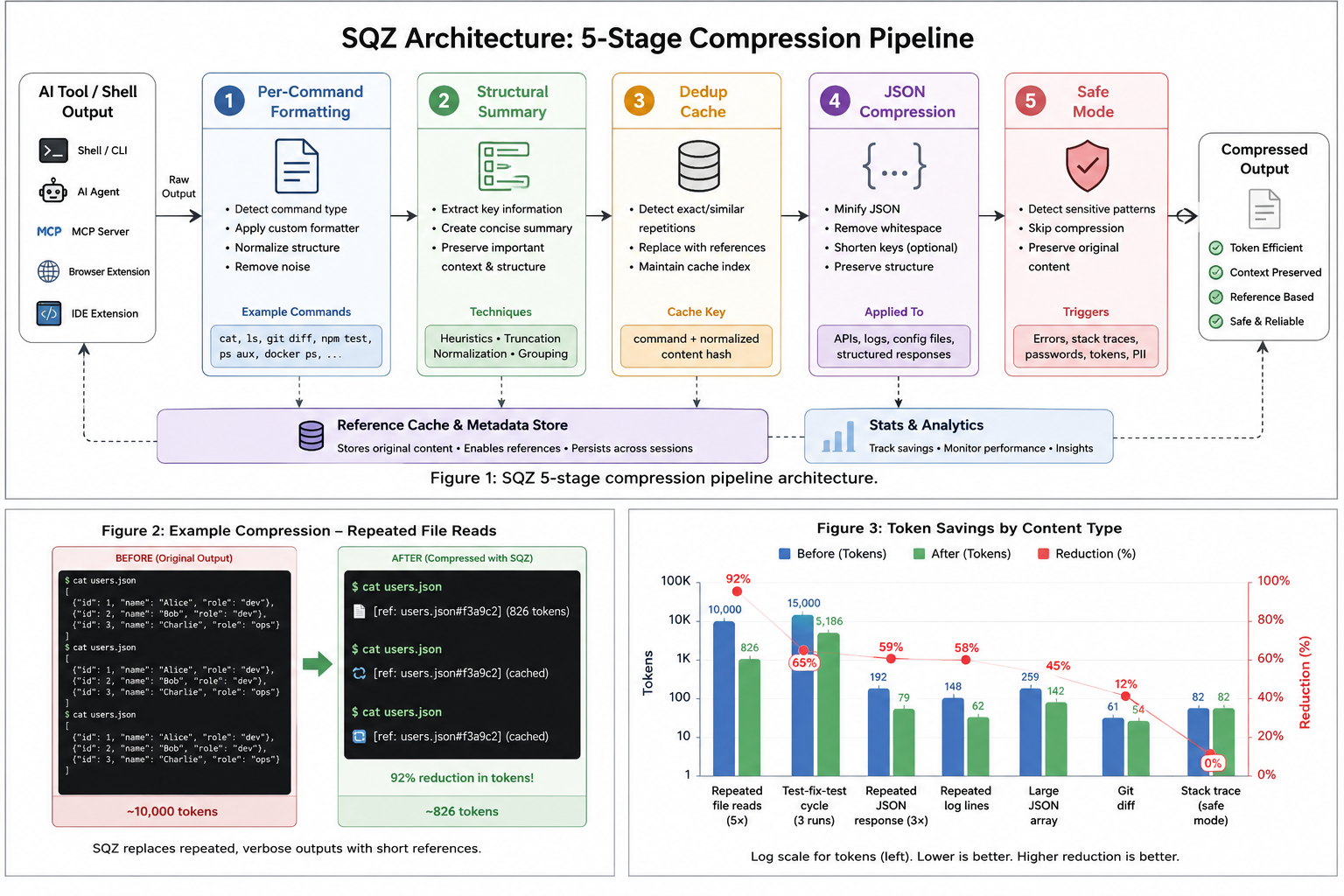
Figure 1: sqz system architecture — integration surfaces, 8-stage compression pipeline, and supporting subsystems.
On frameworks that have one, sqz operates as a PreToolUse hook: a command the agent framework invokes before a shell tool call runs, which rewrites the command so its output passes through sqz before it reaches the model. The system comprises four integration surfaces (CLI Hook, MCP Server, Browser Extension, IDE Extension) feeding into a unified Rust core (sqz_engine) with an 8-stage compression pipeline. Three supporting subsystems handle persistence (SHA-256 cache, SQLite FTS5 store, CTX session graph), intelligence (TOON lossless encoder, AST parser supporting 18 languages, model router), and analytics (USD cost tracking, multi-agent budgets, correction log). The entire system operates with zero telemetry, fully offline, and is air-gap capable.
The architecture has five logical stages:
2.1 Domain-Specific Structural Formatters
Rather than treating all text uniformly (as token-level compression methods do), sqz has per-command formatters (git, cargo, npm and its relatives, pytest, go, gradle, maven, dotnet, docker, kubectl describe/apply, terraform, grep and others) and applies format-aware transformations:
- Test output → failures only (passing tests stripped)
- Git status → compact change summary
- JSON responses → fields that are null or an empty string, array or object stripped, bookkeeping fields (
__v,etag, request and correlation ids) dropped, strings over 500 characters cut, arrays of objects written as lossless TOON tables - Docker → compact
docker psanddocker imagestables;kubectl getandlogsgo through the generic pipeline - Build logs → error-focused summarization
This exploits the observation from CodeComp [7] that source code and structured outputs have formal semantics governed by structure rather than surface-level co-occurrence. A cargo test output of 500 lines can be faithfully represented by 30 lines containing only the failures and their locations.
2.2 Content-Addressed Deduplication
Agentic sessions exhibit high repetition: the same file is read multiple times, the same command re-run after edits, the same API response fetched across turns. sqz maintains a persistent SHA-256 content cache (surviving across process invocations via SQLite) and replaces repeated content with a 13-token reference marker (§ref:HASH§).
This is analogous to the demand paging concept described in [8], where context content is loaded on-demand rather than kept resident. The key insight is that in coding sessions, the dominant savings come not from compressing individual outputs harder, but from recognizing that the same content appears repeatedly.
A reference is only emitted while the content it points at is plausibly still in the model’s context: refs expire after a freshness window (30 minutes of wall-clock time by default) and are invalidated eagerly when the agent framework compacts its history, at which point the content is re-sent in full. As of 1.4.0, entries can also be pinned (sqz pin), exempting them from the freshness check — useful for stable knowledge-base content (project docs, system prompts) that multiple agents sharing the session store reference across days.
Near-duplicate deltas. A file re-read after a small edit is not byte-identical, so exact hashing misses it. sqz detects near-duplicates of cached entries and emits a line-level delta: the changed lines with one unchanged line on each side, plus a reference to the version the model already has. Deltas come from the sqz MCP tools and the MCP proxy; the shell hook path has none, so a file re-read with cat after an edit is sent in full. Since 1.5.0 a session-lifetime MinHash LSH index selects delta candidates, so a file re-read late in a long session still matches its earlier version rather than only the most recent cache entries.
Ranged (slice) references, 1.8.0. A field measurement over one user’s real Claude Code sessions (measurement script published [15]; counters reset at each compaction boundary, edit/write confirmations excluded) found that byte-identical repeats were rare (0.3% of result characters; 1 in 542 file reads) but 8.4% of file reads were a line range of a file already read in full — sed -n '41,80p' after cat, or a ranged read tool call. Exact hashing misses these entirely, and near-duplicate matching does too: a 40-line slice of a 500-line file has a Jaccard similarity near 0.1. sqz therefore checks containment: when new output is, on line boundaries, a slice of a fresh full read whose served bytes also contain the slice, it emits §ref:HASH:L41-80§ instead of the lines. The second condition matters — the slice must appear in what was actually delivered to the model, so a ranged reference can never point at lines a lossy stage dropped. Guards: at least 160 bytes and two lines, and the same freshness and compaction rules as whole-content refs. The reference is not a summary; it is a pointer to bytes the model already holds, and sqz expand 'HASH:L41-80' recovers exactly those lines on demand.
Measured empirically: dedup accounts for 92% reduction on repeat reads, compared to 11.5-73.6% from first-pass compression on the engine benchmark inputs (benchmarks.rs, excluding the stack trace and prose rows).
2.3 Adaptive Pressure-Aware Compression
Inspired by research on adaptive compression rate allocation [9, 10], sqz dynamically adjusts compression intensity based on session pressure — the rate of token injection over a sliding window:
- Low pressure (<50% of estimated budget consumed in 30 minutes): Default mode, preserve maximum detail
- High pressure (>80%): Escalate to aggressive compression, accepting higher information loss
- Critical (>90%): Maximum compression + proactive dedup
This implements the core finding from ACC-RAG [10] that static compression rates are suboptimal: early in a session detail preservation matters more, while late in a session token scarcity demands harder compression.
2.4 Pattern-Based Safety Routing
Not all content should be compressed. Stack traces contain exact line numbers that compression could corrupt. Configuration files with credentials should not be parsed and reformatted. Migration SQL must be preserved byte-exact.
sqz classifies content into risk tiers with pattern checks, plus an entropy measure that separates boilerplate from normal content:
- Safe mode: stack traces with their frames (a Rust
stack backtrace:with numbered frames, a PythonTracebackwithFilelines, JVM and JavaScriptatframes, Go goroutine dumps), PEM blocks, credential lines (key=valueorkey: valuewith a secret-looking key), SQL DDL at the start of a line. These checks match whole lines, so a log line or commit message that only mentions a password or a panic does not qualify. Safe-mode content passes through unchanged at any size and is never cached. On the shell hook a per-command formatter still runs first and may summarize the rest of a test run around such content, but its summary is used only when it keeps every line of the paragraphs that hold it. Output that only mentions such markers is compressed as usual but is not cached either, so anything a lossy stage drops from it cannot be expanded. - Default mode: Normal code, git output, build logs
- Aggressive mode: content with very low average entropy, such as repetitive logs and boilerplate; it currently runs the same pipeline as default mode
This addresses the concern raised in [11] that compression methods which rely on generic importance metrics can inadvertently remove functionally critical tokens.
Version 1.4.0 extended the safety model with three fidelity guarantees derived from field reports:
- Byte-faithful file reads. The MCP file tools (
sqz_read_file,sqz_grep,sqz_list_dir) bypass every content-altering pipeline stage — a file read returns its bytes verbatim apart from ANSI stripping. Token savings on this path come exclusively from dedup references on repeat reads, never from dropping content. (Previously, entropy truncation could silently remove below-median-entropy segments from source files.) - Refuse-to-guess formatting. Structural formatters bail out to raw passthrough rather than emit a partial or misclassified summary. The
git statusformatter, for example, parses porcelain output strictly, matches localized long-format section headers against git’s own translation files (it/de/fr/es/pt_PT), and passes any unrecognized locale or section through unmodified — a wrong summary is strictly worse than no compression. - UTF-8 boundary safety. All truncation and splitting of user-controlled text rounds to character boundaries, so densely non-ASCII output (Cyrillic, CJK, Arabic, emoji) can never crash the compressor mid-pipeline; the property is enforced by randomized tests over arbitrary strings and cut points.
2.5 N-gram Abbreviation
For session-level compression beyond dedup, sqz observes recurring multi-token phrases across the session and introduces compact abbreviations. This technique is inspired by BPE (Byte Pair Encoding) applied at the output level rather than the tokenizer level — frequently co-occurring phrases are replaced with shorter representations.
Abbreviation is deliberately lossy for identifiers: only the first occurrence of a repeated phrase survives verbatim, so a commit SHA or file path embedded in a repeated phrase would be replaced by its abbreviation symbol on later lines. Since 1.4.0 the technique is opt-out (--no-abbrev or SQZ_NO_ABBREV=1, mirroring the dedup opt-out) and the generated agent guidance documents the escape hatch, so an agent that needs to copy-paste identifiers verbatim can disable it per command.
3. Integration Model
Unlike prompt compression tools that require API interception or model-specific adapters, sqz integrates at the tool execution boundary: through a hook where the framework has one that can rewrite tool calls, and through agent guidance plus an MCP server where it does not:
| Framework | Hook Mechanism |
|---|---|
| Claude Code | PreToolUse JSON hook (Bash and PowerShell tools) + PostToolUse hook (Bash) + MCP server |
| Cursor | .cursor/rules/sqz.mdc guidance |
| Windsurf | .windsurf/rules/sqz.md guidance |
| Cline / Roo Code | .clinerules guidance |
| Kiro | .kiro/steering guidance + .kiro/settings/mcp.json MCP entry |
| Gemini CLI | BeforeTool hook |
| OpenCode | TypeScript plugin + opencode.json MCP entry |
| Codex | AGENTS.md guidance + config.toml MCP entry |
| Zed | .rules/AGENTS.md instructions + context_servers MCP entry |
| Copilot CLI | preToolUse hook |
| Any MCP server | sqz-mcp proxy wrapper (since 1.6.0) |
A single sqz init command detects installed frameworks and configures each one. On Claude Code, Gemini CLI, Copilot CLI and OpenCode the integration is transparent: the hook or plugin rewrites shell commands, and the agent receives compressed output without doing anything. On Kiro, Codex, Zed, Cursor, Windsurf and Cline it is advisory: sqz saves tokens only when the agent pipes output through sqz compress or calls the sqz MCP tools, and the client’s built-in shell and file tools bypass it. sqz doctor reports each client’s tier.
Since 1.6.0 the MCP proxy provides a framework-independent integration surface: sqz-mcp proxy -- <upstream command> wraps any stdio MCP server, compresses its tool results through the full pipeline (dedup references on repeats, safe mode for stack traces and secrets, error results untouched), optionally compacts verbose tool descriptions in tools/list, and injects an sqz_expand tool so the agent can recover any cached original byte-exact. The client sees a normal MCP server, so this works with every MCP client regardless of whether it supports hooks.
4. Evaluation
4.1 Token Savings
Measured across a real developer’s week of agentic coding (3,003 compressions):
| Metric | Value |
|---|---|
| Total compressions | 3,003 |
| Tokens in (original) | 721,840 |
| Tokens out (compressed) | 543,398 |
| Tokens saved | 178,442 |
| Average reduction | 24.7% |
| Peak reduction (dedup) | 92% |
4.2 Per-Category Performance
The first four rows are repeats through the shell hook path (sqz compress --cmd, release binary, fresh database), counted in cl100k tokens of everything the agent sees: the reference plus sqz’s one-line note on stderr. The other rows are single compressions from cargo test -p sqz-engine benchmarks, counted in chars/4.
| Content Type | Before | After | Reduction |
|---|---|---|---|
Same cargo test output again | 366 | 39 | 89% |
| Lines 41-80 of a 200-line file read earlier | 260 | 35 | 87% |
Unchanged git status again | 166 | 37 | 78% |
| Same JSON API response again | 165 | 42 | 75% |
| Repeated log lines | 148 | 39 | 74% |
| Large JSON array | 259 | 111 | 57% |
| Git diff | 61 | 54 | 11% |
| Stack trace (safe mode) | 82 | 82 | 0% |
4.3 Prompt Cache Impact
Because sqz operates pre-injection (before content enters the context), the message prefix used for prompt caching remains unchanged. This is a critical advantage over post-hoc pruning methods which modify history and invalidate cached prefixes.
4.4 Latency
sqz is implemented as a single Rust binary with zero runtime dependencies. On an Apple M4 Pro, a sqz compress call takes 39.1-43.2 ms p50 end to end for outputs up to 10 KB (p99 43.1-52.7 ms), and most of that is fixed cost: about 13 ms of process start (sqz --version p50 12.9 ms) and about 22-25 ms to build the cl100k tokenizer. Warm and in process, SqzEngine::compress has a p99 under 3.1 ms up to 10 KB and 18.4-26.3 ms at 100 KB, except JSON at 76.5 ms. End to end, a call takes 76.0-85.5 ms p50 at 100 KB and 329.8-525.2 ms p50 at 1 MB, depending on content.
5. Related Work
Prompt Compression. LLMLingua [2] and LLMLingua-2 [3] achieve 2-20× compression by removing non-essential tokens using a small classifier model. These operate on the entire prompt (system + user + history) and require an additional LLM inference pass. sqz differs by targeting only tool outputs, requiring no LLM call, and operating at the structural rather than token level.
Context Pruning. ACON [6] optimizes compression guidelines for long-horizon agents by analyzing failure trajectories. Dynamic Context Pruning [5] manages conversation history post-hoc. These complement sqz — they handle what’s already in context, while sqz reduces what enters context.
Structural Compression for Code. CodeComp [7] demonstrates that attention-only compression discards structurally critical tokens (call sites, branch conditions). sqz’s domain-specific formatters address this by understanding output structure rather than relying on statistical importance.
Information-Theoretic Perspectives. [12] frames compressor-predictor systems through mutual information, showing that larger compressors are more token-efficient. sqz is consistent with this framework — it functions as a deterministic, zero-parameter “compressor” that maximizes information per token through structural awareness rather than learned compression.
Structurally Lossless Trimming. [13] introduces a three-pass algorithm that strips mechanical bloat (raw tool outputs, base64 images, metadata) while preserving user messages verbatim, achieving up to 86% reduction. sqz operates at a complementary point — before injection rather than during trimming — but shares the insight that tool outputs are the dominant source of context bloat.
6. Limitations and Future Work
- Token counting: the compression pipeline counts tokens with real BPE tokenizers (tiktoken
o200k_basefor OpenAI models — exact;cl100k_baseas a ~5%-variance approximation for Claude and Gemini; chars/4 for unknown local models). The dedup fast path and MCP-side estimates still use the chars/4 heuristic for latency, so aggregate savings figures mix exact and approximate counts. - JSONC round-trip: For tools using JSON-with-comments configs, programmatic merging cannot preserve comments. sqz warns before merging OpenCode configs and refuses to rewrite Zed settings files entirely, printing a copy-paste snippet instead — safe, but it leaves one manual step for those users.
- No semantic compression: sqz does not use an LLM to summarize content. This is by design (no model call, zero cost, deterministic), but means it cannot capture semantic redundancy across structurally different outputs.
- Dedup granularity: exact whole-content hashing, line-aligned slice containment (1.8.0), and near-duplicate deltas via MinHash LSH [14] (1.5.0) cover identical, ranged, and lightly-edited re-reads. Overlaps that are not line-aligned, and structural duplicates across different serializations (the same record fetched once as JSON and once as a table), still re-send in full.
Future directions include structural dedup across serializations, integration with KV cache compression methods [7], learned formatters that adapt to project-specific output patterns, and an end-to-end evaluation measuring agent task success with and without compression rather than token counts alone.
7. Conclusion
sqz demonstrates that significant token savings (24.7% average, 92% on dedup hits) are achievable through pre-injection structural compression, without model fine-tuning or additional LLM calls. By operating at the tool output boundary, sqz is framework-agnostic, cache-friendly, and transparent on frameworks with a rewrite hook. The combination of domain-specific formatters, content deduplication, and adaptive pressure-awareness produces a practical system that reduces costs and improves session longevity for real-world agentic coding workflows.
References
[1] T. Pan, “Tool Output Compression: The Injection Decision That Shapes Context Quality,” 2026. Available: https://tianpan.co/blog/2026-04-20-tool-output-compression-context-injection
[2] H. Jiang, Q. Wu, C.-Y. Lin, Y. Yang, and L. Qiu, “LLMLingua: Compressing Prompts for Accelerated Inference of Large Language Models,” in Proc. EMNLP, 2023. arXiv:2310.05736
[3] Z. Pan et al., “LLMLingua-2: Data Distillation for Efficient and Faithful Task-Agnostic Prompt Compression,” in Proc. ACL Findings, 2024. arXiv:2403.12968
[4] X. Wang et al., “Lightning-fast Compressing Context for Large Language Model,” in Proc. EMNLP Findings, 2024. arXiv:2406.13618
[5] “Dynamic Context Pruning for Efficient and Interpretable Autoregressive Transformers,” arXiv:2305.15805, 2023.
[6] “Optimizing Context Compression for Long-horizon LLM Agents (ACON),” arXiv:2510.00615, 2024.
[7] Q. Chen, J. Xiong, C. Zhao, S. Yang, and N. Wong, “CodeComp: Structural KV Cache Compression for Agentic Coding,” arXiv:2604.10235, 2025.
[8] “Demand Paging for LLM Context Windows,” arXiv:2603.09023, 2025.
[9] “Developing Adaptive Context Compression Techniques for Large Language Models in Long-Running Interactions,” arXiv:2603.29193, 2025.
[10] “Enhancing RAG Efficiency with Adaptive Context Compression (ACC-RAG),” arXiv:2507.22931, 2025.
[11] “When Goal-Gradient Importance Meets Dynamic Skipping,” arXiv:2505.08392, 2025.
[12] “An Information Theoretic Perspective on Agentic System Design,” arXiv:2512.21720, 2024.
[13] “DAG-Based State Management and Structurally Lossless Trimming for LLM Agents,” arXiv:2602.22402, 2025.
[14] “MinHash LSH in Milvus: The Secret Weapon for Fighting Duplicates in LLM Training Data,” Milvus Blog, 2025.
[15] harrison001, “Count repeated tool output in Claude Code logs: byte-identical repeats and slice re-reads (containment),” GitHub Gist, 2026. Available: https://gist.github.com/harrison001/76250b61ad665bf9a377e7096dffdbe0
Citation
@software{sqz2026,
  author = {Chugh, Ojus},
  title = {sqz: Pre-Injection Context Compression for Agentic Code Generation},
  year = {2026},
  url = {https://github.com/ojuschugh1/sqz},
  version = {1.8.0}
}
sqz is open source, dual-licensed under MIT and Apache 2.0. Source code, benchmarks, and documentation available at github.com/ojuschugh1/sqz.
sqz Platform Integrations
sqz integrates with AI coding tools at three levels, depending on how deeply the platform supports MCP and shell hooks.
Integration Levels
Level 1 — MCP Config Only
These platforms support MCP natively. Just add the sqz-mcp server to their config file.
| Platform | Config file |
|---|---|
| Continue | ~/.continue/config.json |
| Zed | ~/.config/zed/settings.json |
See level1/continue.json and level1/zed.json for ready-to-paste config snippets.
Level 2: sqz init + MCP
These platforms use the CLI proxy (sqz compress) and the MCP server. On transparent clients (Claude Code, Gemini CLI, Copilot CLI, OpenCode) sqz init installs a hook or plugin that routes shell commands through sqz on its own. On advisory clients (Kiro, Codex, Zed, Cursor, Windsurf, Cline) it writes agent guidance (steering, AGENTS.md or a rules file), and sqz saves tokens only when the agent pipes output through sqz compress or calls the sqz MCP tools. sqz init registers the MCP server for Claude Code, Kiro, Codex, Zed and OpenCode; for the other clients add the MCP config by hand. Goose, Aider and Amp are not configured by sqz init; they take the MCP config only.
Setup (all Level 2 platforms):
# Step 1: write hooks, guidance and MCP entries for the clients sqz init supports
sqz init

# Step 2: add MCP config where sqz init does not (see platform-specific guide below)
Platforms: Claude Code, Cursor, Copilot, Windsurf, Gemini CLI, Codex, OpenCode, Goose, Aider, Amp
sqz doctor shows what was configured for each client and its tier.
See Claude Code, Cursor, Codex CLI and all platforms for platform-specific guides.
Level 3 — Native / Deep Integration
Native extensions for VS Code, JetBrains, Chrome (5 web UIs), and API proxy mode.
| Platform | Guide |
|---|---|
| VS Code Marketplace | level3/vscode-marketplace.md |
| JetBrains Marketplace | level3/jetbrains-marketplace.md |
| Chrome Web Store | level3/chrome-web-store.md |
| Firefox Add-ons | level3/firefox-addons.md |
| API proxy (OpenAI, Anthropic, Google AI) | level3/api-proxy.md |
The guides in the table cover publishing to each store; level3/api-proxy.md describes sqz proxy, which compresses a request body and sends it back.
MCP Server Config (all platforms)
The sqz-mcp binary is the MCP server. The config is the same across all platforms:
{
  "mcpServers": {
    "sqz": {
      "command": "sqz-mcp",
      "args": ["--transport", "stdio"],
      "env": {}
    }
  }
}
Make sure sqz-mcp is on your PATH (it’s installed alongside sqz).
Claude Code
Claude Code is a transparent client: sqz init installs hooks that route shell commands through sqz on their own, and registers the sqz MCP server.
Setup
1. Run sqz init
sqz init            # this project: .claude/settings.local.json
sqz init --global   # every project: ~/.claude/settings.json
The settings file gets these hooks:
- PreToolUse (Bash and PowerShell):
sqz hook clauderewrites the command so its output is piped throughsqz compress. - PostToolUse (Bash):
sqz hook claude-postcompresses the stdout and stderr of a successful command the PreToolUse hook left alone, throughupdatedToolOutput. Output Claude Code already cut to a preview (BASH_MAX_OUTPUT_LENGTH), images and interrupted commands are left as they are. It always answers with the compressed text, never a§ref: with the hook installed twice, a reference from the second run pointed at output the model never saw. The original is still stored, so ansqz expandhint in the output works. - PreCompact:
sqz hook precompactmarks cached references stale when Claude Code compacts. - SessionStart (after compaction):
sqz resumere-injects the session context.
It also adds two allow rules to permissions.allow, Bash(set -o pipefail) and Bash(sqz compress --cmd *), which cover only the parts the rewrite adds. The hook does not approve commands: Claude Code’s own permission rules still decide whether a command runs or asks first. When Claude Code asks, or denies a command, its message quotes the rewritten command, such as set -o pipefail; git tag v0 2>&1 for git tag v0. Until both rules are there the hook leaves commands alone. Outside bypass mode, pipelines, loops and heredocs are left as written. In every mode, so is a list where one of the piped commands could stop the shell on a failed expansion (${DEST:?}, $((1/0)), and unless $SHELL is bash an unquoted glob that matches nothing, =cmd or ~user) and more commands follow after ;, || or a newline: piped on its own, the failing command would stop only its pipe and the rest would run. Bypass mode pipes pipelines and loops as one group, and leaves one as written when the group could run different commands than the original: when its leading cd dir && is followed by ;, || or another line, or, with bash as $SHELL, when lines follow one with an expansion such as $((...)), since bash would still run them if it failed.
Your existing settings are kept; sqz merges its entries. If ~/.claude/settings.json already has the sqz hooks, sqz init at project scope leaves them out of .claude/settings.local.json; sqz doctor flags a project copy, and sqz doctor --fix removes it and keeps the file’s permissions.
2. MCP server
sqz init adds the server to ~/.claude.json (user scope, with or without --global):
{
  "mcpServers": {
    "sqz": {
      "command": "sqz-mcp",
      "args": ["--transport", "stdio"]
    }
  }
}
It also writes a guidance block to CLAUDE.md in the project.
3. Verify
sqz doctor
Claude Code should show as configured, transparent. Doctor also flags an older install without the allow rules and an outdated CLAUDE.md block (sqz doctor --fix adds the rules and replaces the block).
What you get
- Shell output compressed before it reaches the context window
- Repeated output replaced by a short
§ref:HASH§reference, re-sent in full after compaction sqz_read_file,sqz_grepandsqz_list_dirfor reads the hook cannot see: Claude Code’s built-in Read tool does not go through Bash, and sqz does not rewrite its results
Uninstall
sqz uninstall
Removes sqz’s hooks and allow rules from the settings file, the guidance block from CLAUDE.md and the sqz entry from ~/.claude.json, leaving everything else.
Cursor
Cursor is an advisory client: it can’t let sqz rewrite tool calls, so sqz saves tokens there only when the agent pipes output through sqz compress or calls the sqz MCP tools. Cursor’s built-in terminal and file tools bypass sqz.
Setup
1. Write the rules file
sqz init
This writes .cursor/rules/sqz.mdc (alwaysApply: true), which tells the agent to pipe long command output through sqz compress and to prefer the sqz MCP tools.
2. Add MCP config
sqz init does not register the MCP server for Cursor. Open Cursor settings → MCP, or edit ~/.cursor/mcp.json:
{
  "mcpServers": {
    "sqz": {
      "command": "sqz-mcp",
      "args": ["--transport", "stdio"],
      "env": {}
    }
  }
}
3. Restart Cursor
Cursor picks up MCP server changes on restart. sqz doctor shows Cursor as configured, advisory.
Hooks from older sqz versions
sqz init 0.4.0 through 0.7.0 also wrote .cursor/hooks.json, with a hook that runs sqz hook cursor (0.4.0 to 0.6.0 in Claude Code’s hook format). From 0.7.0 through 1.9.0, sqz hook cursor answered every rewrite with an approval, which lets Cursor run the command without asking. It now prints nothing and exits 1, which Cursor treats as a failed hook: Cursor’s own approval applies and the command runs as written, uncompressed. sqz doctor reports such a hook in .cursor/hooks.json or ~/.cursor/hooks.json, and sqz doctor --fix and sqz uninstall remove it, keeping any other hooks in the file and deleting the file when nothing else is left.
What you get
- CLI output compressed when the agent pipes it through
sqz compress sqz_read_file,sqz_grepandsqz_list_dir, with repeat results replaced by a short reference
Codex CLI
OpenAI’s Codex CLI has no per-tool-call hook (the only documented event hook, notify, fires at the end of a turn, after the model has already seen the tool output), so sqz cannot rewrite its shell commands transparently the way it does for Claude Code or Gemini CLI. Two things Codex does support reliably carry the integration instead:
AGENTS.mdat the project root, read at session start.sqz initwrites a fenced block that tells Codex to pipe long-running commands throughsqz compress, when not to, and how to recover from a§ref:HASH§token.- MCP servers in
~/.codex/config.tomlunder[mcp_servers.<id>].sqz initmerges ansqzentry so Codex getscompress,passthrough,expand,sqz_recall,sqz_read_file,sqz_grepandsqz_list_dir.
Setup
cargo install sqz-cli sqz-mcp     # or brew / npm / pipx, see the README
cd your-project
sqz init --only codex
sqz init with no --only does the same as part of setting up every tool it detects.
What it writes:
-
./AGENTS.md: appends (or creates) a block between<!-- BEGIN sqz-guidance -->and<!-- END sqz-guidance -->markers, the same block the Zed integration uses. Anything else in the file is left alone. Re-runningsqz init(orsqz doctor --fix) replaces only that block, and folds the separatesqz-agents-guidanceandsqz-zed-guidanceblocks older versions wrote into it. -
~/.codex/config.toml(or$CODEX_HOME/config.tomlif set): adds[mcp_servers.sqz] command = "sqz-mcp" args = ["--transport", "stdio"]The key is
mcp_servers(snake_case).mcpServersis the JSON convention used by other clients and Codex ignores it. If an[mcp_servers.sqz]entry with acommandalready exists, sqz does not overwrite it. Other servers in the file are untouched.
Verify:
sqz status
Then start Codex in the project and ask it to run a noisy command (npm install, cargo test). You should see [sqz] N/M tokens (X% reduction) in the tool output, and repeated file reads coming back as §ref:…§ references.
What you get
- Shell output compressed when Codex follows the AGENTS.md guidance and pipes through
sqz compress(per-command formatters, dedup references on repeats, safe mode for stack traces and secrets). - Compressed file reads, greps and directory listings through the
sqz_*MCP tools, with 13-token references on repeat reads and line-level deltas after small edits. sqz_recallfor recovering exact tool output after Codex compacts its context.expandfor getting back what a§ref:HASH§stands for, andSQZ_NO_DEDUP=1/SQZ_NO_ABBREV=1as per-command opt-outs, all documented in the block Codex reads.
Limits
Because the shell side depends on guidance rather than a hook, compression is only as consistent as Codex’s adherence to AGENTS.md. In practice it follows the block well for the commands listed in it. If sqz stats --breakdown shows a command you run often with no savings, mention it in your own part of AGENTS.md (sqz rewrites what is between its markers), or use the MCP tools for that operation instead.
Codex’s features.codex_hooks flag is documented as experimental and off by default. sqz will target it once the hooks.json schema is stable.
Uninstall
sqz uninstall
Removes the AGENTS.md block (leaving the rest of the file) and the [mcp_servers.sqz] table (leaving other servers).
Level 2 Platform Setup — All Platforms
All Level 2 platforms follow the same two-step setup: run sqz init, then add the MCP config where sqz init does not.
Step 1: run sqz init (all platforms)
sqz init
This writes a hook or plugin for Claude Code, Gemini CLI, Copilot CLI and OpenCode, agent guidance for Kiro, Codex, Zed, Cursor, Windsurf and Cline, and the MCP entry for Claude Code, Kiro, Codex, Zed and OpenCode. An existing .gemini/settings.json gets the Gemini CLI hook merged in; if it has comments or doesn’t parse, sqz init leaves it alone and prints the entry to add by hand. It also adds the sqz_run shell helpers to your shell profile and creates default presets. Goose, Aider and Amp are not configured by sqz init.
Step 2 — Add MCP config
Find your platform below and paste the config into the appropriate file.
Claude Code
File: ~/.claude.json (sqz init writes this entry for you)
{
"mcpServers": {
"sqz": {
"command": "sqz-mcp",
"args": ["--transport", "stdio"],
"env": {}
}
}
}
Cursor
File: ~/.cursor/mcp.json
{
"mcpServers": {
"sqz": {
"command": "sqz-mcp",
"args": ["--transport", "stdio"],
"env": {}
}
}
}
GitHub Copilot (VS Code)
File: .vscode/mcp.json (workspace) or ~/.vscode/mcp.json (global)
{
"servers": {
"sqz": {
"type": "stdio",
"command": "sqz-mcp",
"args": ["--transport", "stdio"]
}
}
}
Windsurf
File: ~/.codeium/windsurf/mcp_config.json
{
"mcpServers": {
"sqz": {
"command": "sqz-mcp",
"args": ["--transport", "stdio"],
"env": {}
}
}
}
Gemini CLI
File: ~/.gemini/settings.json
{
"mcpServers": {
"sqz": {
"command": "sqz-mcp",
"args": ["--transport", "stdio"],
"env": {}
}
}
}
Codex (OpenAI)
File: ~/.codex/config.toml (TOML, snake_case key). sqz init merges this entry for you and leaves the rest of the file alone.
[mcp_servers.sqz]
command = "sqz-mcp"
args = ["--transport", "stdio"]
See codex.md for the full setup.
OpenCode
File: opencode.json (project root) or ~/.config/opencode/opencode.json
{
"mcp": {
"sqz": {
"type": "local",
"command": ["sqz-mcp", "--transport", "stdio"],
"enabled": true
}
}
}
sqz init also writes the plugin ~/.config/opencode/plugins/sqz.ts, which routes shell commands through sqz on OpenCode 1 and 2 (sqz print-opencode-plugin prints it). OpenCode 2 does not load the plugin sqz 2.0.0 and earlier wrote; sqz doctor reports it, and sqz doctor --fix or sqz init rewrites it.
Goose
File: ~/.config/goose/config.yaml
extensions:
sqz:
type: stdio
cmd: sqz-mcp
args:
- --transport
- stdio
enabled: true
Aider
Aider uses MCP via a config file. Add to ~/.aider.conf.yml:
mcp_servers:
sqz:
command: sqz-mcp
args:
- --transport
- stdio
Or pass on the command line:
aider --mcp-server sqz-mcp --mcp-args "--transport stdio"
Amp
File: ~/.config/amp/mcp.json
{
  "mcpServers": {
    "sqz": {
      "command": "sqz-mcp",
      "args": ["--transport", "stdio"],
      "env": {}
    }
  }
}
Verify your setup
After completing both steps, run:
sqz doctor
It lists each client sqz init configured with its tier (transparent or advisory), checks the shell helpers, and reports whether anything was compressed recently.
What you get on all Level 2 platforms
- CLI output compressed before it reaches the LLM context window: on its own on transparent clients, when the agent pipes it through
sqz compresson advisory ones sqz_read_file,sqz_grepandsqz_list_dir, with repeat results replaced by a short reference- Per-command token usage with
sqz stats --breakdown
API proxy
sqz proxy starts a local HTTP endpoint that compresses an OpenAI, Anthropic or Google AI request body and sends it back. It does not forward requests: nothing reaches the provider, and an API client pointed at it as its base URL gets the compressed request back instead of a model response. Use it to see what sqz would change in a request, or to compress a body in your own code before you send it to the provider yourself.
No release has forwarded requests, though 0.5.0 through 1.9.0 printed OPENAI_BASE_URL and ANTHROPIC_BASE_URL examples when the endpoint started.
Start it
sqz proxy --port 8080
--port (default 8080) is the only option. The endpoint listens on 127.0.0.1 and runs until you stop it. It handles one connection at a time and takes each request from one read of at most 1 MB. A body that has not fully arrived when that read returns is cut short: it comes back unparsed, as a string in compressed_body, or the client gets a connection error and no complete answer. Whether and where a body is cut depends on timing, not on a fixed size: on macOS, bodies of 60 KB to 160 KB were sometimes cut and sometimes not, no body of 200 KB or more came back whole, and one 200 KB body was cut after 16 KB.
Send it a request
POST the request body to a path that names its format:
| Path contains | Format | Example path |
|---|---|---|
/chat/completions | OpenAI | /v1/chat/completions |
/messages | Anthropic | /v1/messages |
/generateContent | Google AI | /v1beta/models/gemini-2.5-flash/generateContent |
Google AI’s own models/<model>:generateContent path has no / before generateContent, so the endpoint answers it with 404.
curl -s http://127.0.0.1:8080/v1/chat/completions --data-binary @request.json
The answer is a JSON object, with the estimated saving in an x-sqz-tokens-saved header. For a 13-message OpenAI request with two long older turns and a 30-row JSON tool result:
{
  "compressed_body": { "messages": [ ... ], "model": "gpt-4o" },
  "compressed_tokens": 334,
  "messages_compressed": 2,
  "messages_summarized": 2,
  "original_tokens": 1048,
  "reduction_pct": "68.1%",
  "sqz_proxy": true
}
compressed_body is the request with sqz’s changes. The token figures are estimates.
What it changes
- OpenAI:
systemandtoolmessages go through the sqz compression pipeline, anduserandassistantmessages before the 10 most recent are summarized. - Anthropic: the
systemprompt andtool_resultblocks go through the pipeline, anduserandassistantmessages before the 10 most recent are summarized. - Google AI: the
system_instructionparts and the text parts ofcontentsgo through the pipeline, except that long text parts before the 10 most recent contents are summarized instead.
A summary keeps the first and last line of a message that has more than three lines and about 200 characters or more, with [... N lines, M chars ...] between them. Only string content is changed; for Anthropic that includes the text of tool_result blocks. The rest of the body comes back as it was sent, though the order of keys may change.
Other answers
/and/health, with any method:{"status":"ok","service":"sqz-proxy"}.- Any other path with a method other than POST: 405.
- A POST to a path without one of the strings above: 404.
- A body that is not JSON: sent back unchanged, as a string in
compressed_body, with a line on stderr.
VS Code Marketplace Publishing Guide
The sqz VS Code extension is published to the VS Code Marketplace under the sqz publisher.
Prerequisites
npm install -g @vscode/vsce
Log in with your publisher token (create one at https://marketplace.visualstudio.com/manage):
vsce login sqz
Required package.json fields
The following fields must be present and accurate before publishing:
{
  "name": "sqz",
  "displayName": "sqz — Context Intelligence",
  "description": "Compress and manage LLM context in VS Code.",
  "version": "0.1.0",
  "publisher": "sqz",
  "engines": { "vscode": "^1.85.0" },
  "categories": ["Other"],
  "repository": {
    "type": "git",
    "url": "https://github.com/ojuschugh1/sqz"
  },
  "license": "MIT OR Apache-2.0",
  "icon": "images/icon.png"
}
Key rules:
publishermust match your verified Marketplace publisher IDiconmust be a 128×128 PNGrepositoryis required for the Marketplace listingversionmust be bumped for each publish (semver)
Package the extension
cd vscode-extension
npm install
vsce package
# produces sqz-0.1.0.vsix
Inspect the package contents before publishing:
vsce ls
Publish
vsce publish
Or publish a specific version:
vsce publish minor # bumps minor version and publishes
To publish a pre-release:
vsce publish --pre-release
CI publishing (GitHub Actions)
Store your PAT as VSCE_PAT in repository secrets, then:
- name: Publish to VS Code Marketplace
  run: vsce publish -p ${{ secrets.VSCE_PAT }}
  working-directory: vscode-extension
Verify
After publishing, the extension appears at:
https://marketplace.visualstudio.com/items?itemName=sqz.sqz
Users can install with:
code --install-extension sqz.sqz
JetBrains Marketplace Publishing Guide
The sqz JetBrains plugin is published to the JetBrains Marketplace and works with IntelliJ IDEA, PyCharm, GoLand, and all other IntelliJ-platform IDEs.
Prerequisites
- JDK 17+
- Gradle 8.x+ (install via
brew install gradleor sdkman) - A JetBrains Marketplace account and plugin token
Note: The plugin does not include the Gradle wrapper. You’ll need to have Gradle installed separately.
Required plugin.xml fields
The following fields in src/main/resources/META-INF/plugin.xml must be set before publishing:
<idea-plugin>
  <id>com.sqz.jetbrains-plugin</id>          <!-- unique, never change after first publish -->
  <name>sqz — Context Intelligence</name>
  <version>0.1.0</version>
  <vendor email="sqz@example.com"
          url="https://github.com/ojuschugh1/sqz">sqz</vendor>
  <description><![CDATA[...]]></description>
  <change-notes><![CDATA[Initial release.]]></change-notes>
  <idea-version since-build="233"/>           <!-- minimum IDE build number -->
  <depends>com.intellij.modules.platform</depends>
</idea-plugin>
Key rules:
<id>must be globally unique and must not change after the first publish<version>must be bumped for each publish (semver)<idea-version since-build>controls the minimum compatible IDE version<change-notes>is shown in the Marketplace changelog tab
Build the plugin
cd jetbrains-plugin
gradle buildPlugin
# produces build/distributions/sqz-0.1.0.zip
Run the plugin in a sandboxed IDE to verify before publishing:
gradle runIde
Publish
Set your Marketplace token as an environment variable:
export JETBRAINS_TOKEN=<your-token>
gradle publishPlugin
Or pass it directly:
gradle publishPlugin -Pplugin.verifier.home.dir=/tmp/verifier \
  -Dorg.gradle.project.intellijPublishToken=$JETBRAINS_TOKEN
The publishPlugin task in build.gradle.kts should be configured as:
publishPlugin {
    token.set(System.getenv("JETBRAINS_TOKEN"))
    channels.set(listOf("default"))   // use "eap" for pre-release
}
CI publishing (GitHub Actions)
- name: Publish to JetBrains Marketplace
  run: gradle publishPlugin
  working-directory: jetbrains-plugin
  env:
    JETBRAINS_TOKEN: ${{ secrets.JETBRAINS_TOKEN }}
Verify
After publishing, the plugin appears at:
https://plugins.jetbrains.com/plugin/<plugin-id>
Users can install from within any JetBrains IDE via Settings → Plugins → Marketplace → search “sqz”.
Firefox Add-ons Publishing Guide
The sqz Firefox extension compresses context in ChatGPT, Claude.ai, Gemini, Grok, and Perplexity. Published to Firefox Add-ons (AMO).
Prerequisites
- Rust toolchain with
wasm32-unknown-unknowntarget wasm-pack- A Firefox Add-ons developer account (free)
web-extCLI:npm install -g web-ext
Build the extension
1. Compile the WASM module
From the repository root, the same way as for Chrome:
wasm-pack build sqz-wasm --release --target no-modules --out-dir ../extension/wasm-pkg
cp extension/wasm-pkg/sqz_wasm.js extension/wasm-pkg/sqz_wasm_bg.wasm extension/
2. Build the Firefox extension
sh extension-firefox/build.sh
This copies the shared content scripts, the popup HTML and the two WASM files from extension/ into extension-firefox/, and writes extension-firefox/manifest.json from the Chrome manifest with the gecko settings added and the background as "scripts": ["sqz_wasm.js", "background.js"], so the no-modules glue defines wasm_bindgen before background.js runs.
3. Test locally
cd extension-firefox
web-ext run
Or load manually: about:debugging > This Firefox > Load Temporary Add-on > select extension-firefox/manifest.json.
Key differences from Chrome
| Chrome | Firefox | |
|---|---|---|
| Manifest | "service_worker": "background.js" | "scripts": ["sqz_wasm.js", "background.js"] |
| API namespace | chrome.* | browser.* (promise-based) |
| Extension ID | Auto-assigned | Set in browser_specific_settings.gecko.id (sqz@sqz-dev) |
| Min version | N/A | strict_min_version: "140.0" |
Package for submission
cd extension-firefox
web-ext build
# writes the package zip to web-ext-artifacts/
Or manually, leaving out the old package zip kept in that directory:
cd extension-firefox
zip -r ../sqz-firefox.xpi . -x "*.DS_Store" -x "build.sh" -x "*.zip"
Publish
- Go to Firefox Add-ons Developer Hub
- Click “Submit a New Add-on”
- Upload the
.xpior.zipfile - Fill in listing details: description, screenshots, categories
- Submit for review (typically 1-3 days for listed, instant for self-hosted)
CI publishing (GitHub Actions)
Use web-ext sign:
- name: Publish to Firefox Add-ons
  run: |
    cd extension-firefox
    web-ext sign --api-key=${{ secrets.AMO_API_KEY }} --api-secret=${{ secrets.AMO_API_SECRET }}
Verify
After approval, users install from:
https://addons.mozilla.org/firefox/addon/sqz/
Chrome Web Store Publishing Guide
The sqz Chrome extension compresses context in ChatGPT, Claude.ai, Gemini, Grok, and Perplexity. It is published to the Chrome Web Store.
Prerequisites
- Rust toolchain with
wasm32-unknown-unknowntarget wasm-pack- A Chrome Web Store developer account ($5 one-time fee)
Build the extension
1. Compile the WASM module
From the repository root:
wasm-pack build sqz-wasm --release --target no-modules --out-dir ../extension/wasm-pkg
cp extension/wasm-pkg/sqz_wasm.js extension/wasm-pkg/sqz_wasm_bg.wasm extension/
extension/background.js loads sqz_wasm.js from the extension root with importScripts and calls the global wasm_bindgen it defines, which only the no-modules glue does, then fetches sqz_wasm_bg.wasm from the same place. wasm-pack writes a .gitignore into its output directory, so build into extension/wasm-pkg/ and copy the two files rather than pointing --out-dir at extension/ itself.
2. Load it unpacked
There is no bundling step: extension/ is the extension as it ships. To test it, open chrome://extensions, turn on Developer mode, click Load unpacked and select extension/.
Required manifest.json fields
{
  "manifest_version": 3,
  "name": "sqz — Context Compression",
  "version": "0.5.0",
  "description": "Compresses LLM context in ChatGPT, Claude.ai, Gemini, Grok, and Perplexity.",
  "permissions": ["storage"],
  "host_permissions": [
    "https://chatgpt.com/*",
    "https://chat.openai.com/*",
    "https://claude.ai/*",
    "https://gemini.google.com/*",
    "https://grok.com/*",
    "https://www.perplexity.ai/*"
  ],
  "background": { "service_worker": "background.js" },
  "action": { "default_popup": "popup/popup.html" },
  "web_accessible_resources": [{
    "resources": ["sqz_wasm_bg.wasm", "sqz_wasm.js"],
    "matches": [
      "https://chatgpt.com/*",
      "https://chat.openai.com/*",
      "https://claude.ai/*",
      "https://gemini.google.com/*",
      "https://grok.com/*",
      "https://www.perplexity.ai/*"
    ]
  }]
}
The full manifest, with the content scripts for each site, is extension/manifest.json.
Key rules:
manifest_versionmust be3(MV2 is deprecated)versionmust be bumped for each submission (semver, no pre-release labels)descriptionis shown in the store listing (max 132 characters)- All host permissions must be justified in the privacy disclosure
Package for submission
Zip the contents of extension/, leaving out the tests and the wasm-pack output directory:
cd extension
zip -r ../sqz-extension-0.5.0.zip . -x "tests/*" -x "wasm-pkg/*" -x "*.DS_Store"
Publish
- Go to the Chrome Web Store Developer Dashboard
- Click Add new item and upload the zip
- Fill in the store listing: description, screenshots (1280×800 or 640×400), promotional tile (440×280)
- Set visibility to Public or Unlisted
- Submit for review (typically 1-3 business days)
CI publishing (GitHub Actions)
Use the chrome-webstore-upload-cli:
- name: Publish to Chrome Web Store
  run: npx chrome-webstore-upload-cli upload --source sqz-extension.zip --extension-id $EXT_ID
  env:
    EXTENSION_ID: ${{ secrets.CHROME_EXTENSION_ID }}
    CLIENT_ID: ${{ secrets.CHROME_CLIENT_ID }}
    CLIENT_SECRET: ${{ secrets.CHROME_CLIENT_SECRET }}
    REFRESH_TOKEN: ${{ secrets.CHROME_REFRESH_TOKEN }}
Verify
After approval, users can install from:
https://chrome.google.com/webstore/detail/sqz/<extension-id>